How to do Purchases
You can go to purchases page by clicking on Transaction menu and navigate through purchases submenus and the purchases will open. Follow the following are the steps to record your purchases: – On a space bar with…
By Fabonic Admin
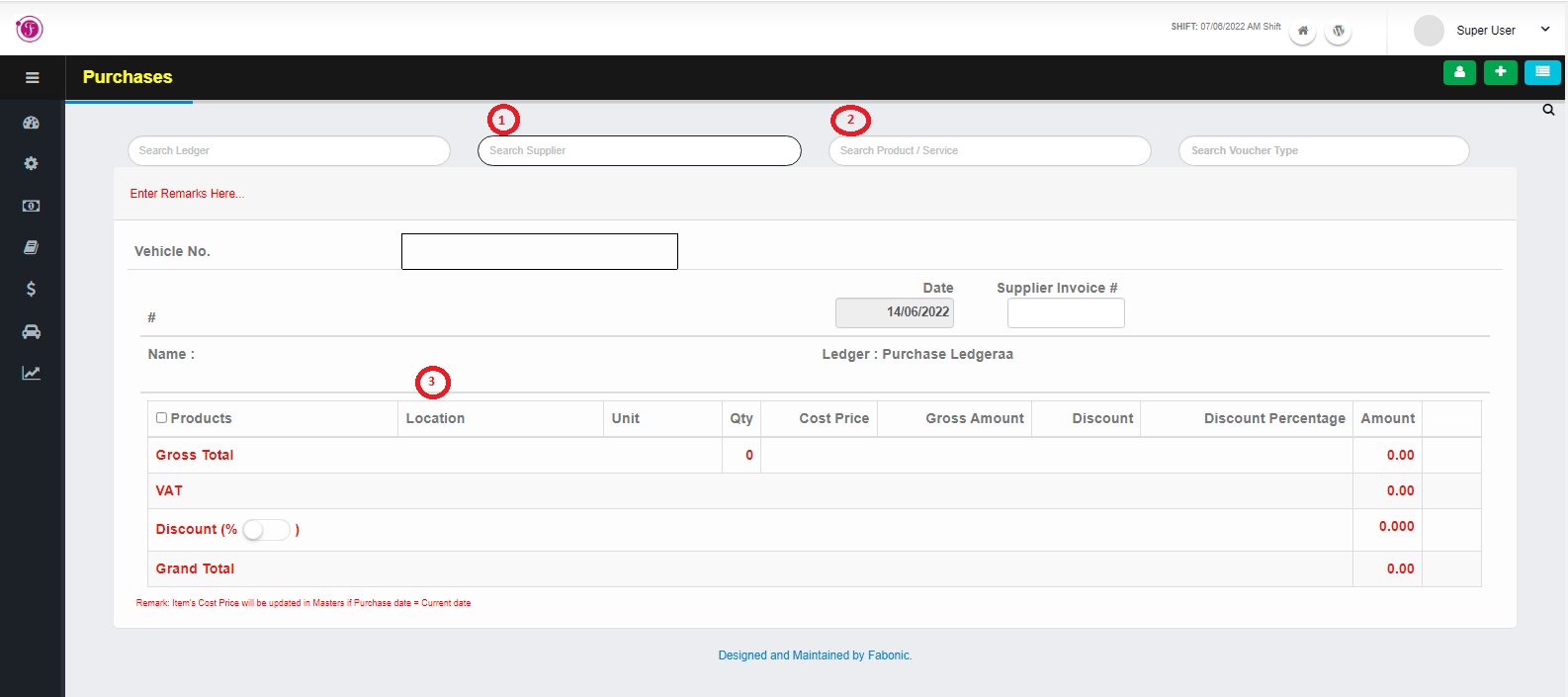
You can go to purchases page by clicking on Transaction menu and navigate through purchases submenus and the purchases will open.
Follow the following are the steps to record your purchases: –
- On a space bar with the name “search supplier” enter the name of the supplier to whom the purchases are done from
- On a space bar with the name “search product / services” enter the name of the products you want to purchase according to the list of services you have in your system
- After entering the product name Enter the locations, Units, Qty, amount of VAT and discount if available
- The cost price always appears automatically from the price you have insert to the system before purchase but when doing purchases, but you can also modify it
- Click the file icon to the save the purchases, plus icon to record another purchase, receipt icon to print the purchase, delete icon to delete
- Click on the icon with lines to see list of other previously purchases, and from the list you can edit, delete, view only and print the previous purchase list